Your AI agents work for clients. Bill them for it.
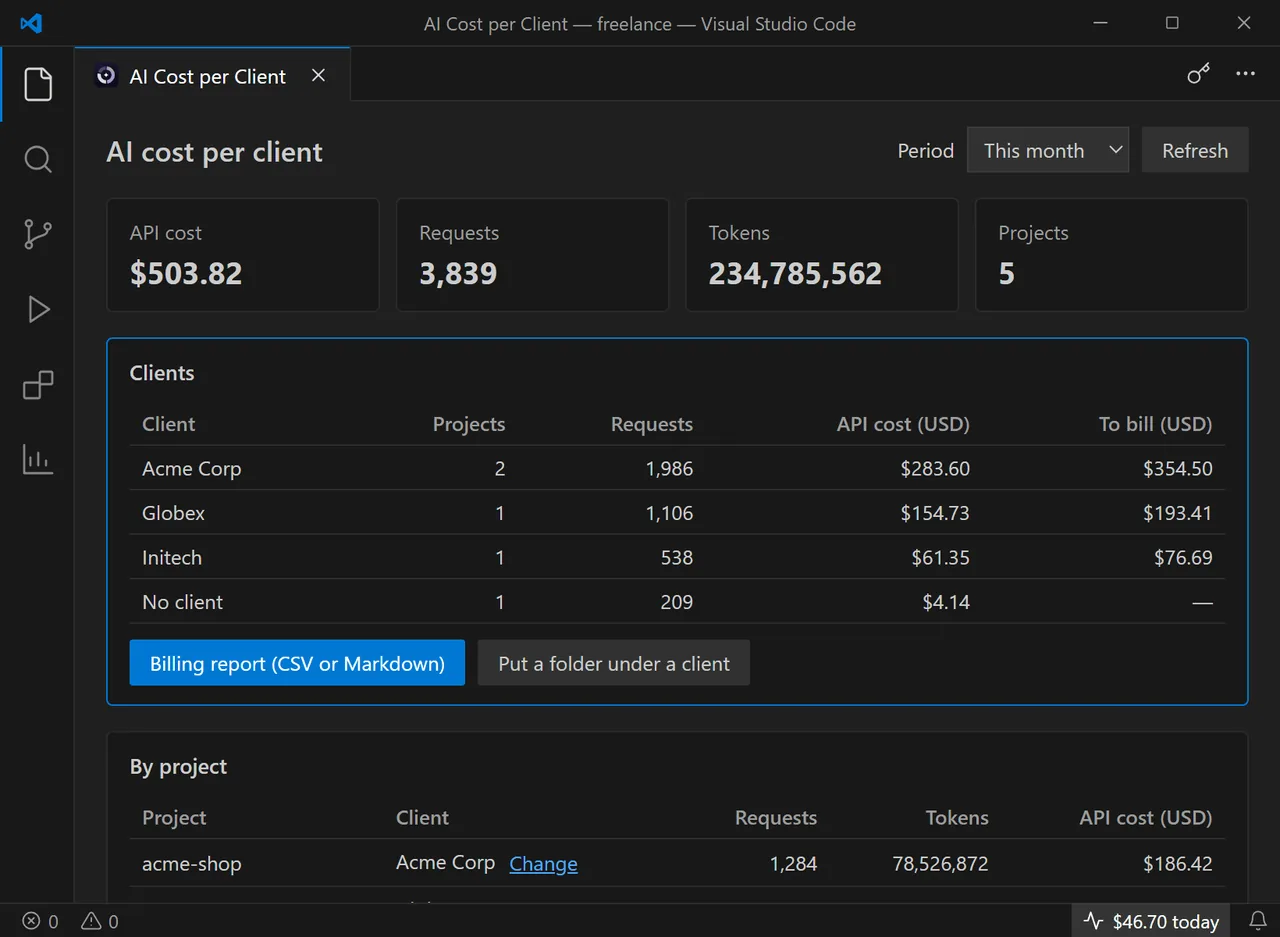
AI Cost per Client reads the logs Claude Code and Codex already write on your machine and shows what each project, day, model and client cost at API list prices. Put a folder under a client, add your markup, export what to bill. Nothing leaves your machine.
- Nothing uploaded
- No account, no API key
- Claude Code + Codex
How it works
Three steps. Your logs stay where they are.
- Install, then glance at the status barThe extension finds the Claude Code logs in ~/.claude/projects and the Codex logs in ~/.codex/sessions on its own. Today's cost appears in the status bar; one click opens the dashboard.
- Put each folder under a clientRight-click a project folder, choose “Put this folder under a client”, type the name. Globs work too: acme-* covers every Acme repository. Every agent session run there now counts for that client.
- Export what to billPick the period, set your currency and your markup, export the report: Markdown to paste into the invoice, CSV for your accounting. Pro also warns you when a client reaches 80% of its monthly budget.
What the extension does
A cost meter for AI coding agents, organised the way you bill: by client. It calls no AI provider and needs no API key. It reads the token counts your agents already log.
Cost per project, day and model
Claude Code and Codex side by side, for today, 7 days, 30 days, this month, last month or all time. Input, output and cache tokens priced at each model's public API rate.
Folders grouped by client
One client, many repositories: list the folders or use a glob. The free version groups them. Pro turns each group into a total and an amount to bill.
Billing report (Pro)
Per client and per project, in Markdown to paste into an invoice or an e-mail, or in CSV for a spreadsheet. Your markup, your currency and your exchange rate applied.
Monthly budget per client (Pro)
Set a budget for each client and get a warning at 80% and at 100%, before the overrun comes out of your margin.
100% local
Logs are read on your machine and never uploaded. No account, no telemetry. The only network call is the licence check with Gumroad when you enter a Pro key, and it carries the key only.
Numbers you can defend
Streamed duplicates counted once, cache and long-context rates included, price table dated. On Claude Max or ChatGPT Pro it shows the API-equivalent value: what you resell, not what you paid.
Free, and Pro when you need it
The free version shows every dollar your agents spend, per project, day and model, with no limit and no expiry. Pro is for the day you bill that time to clients: a single day of agent work left off an invoice usually costs more than a licence you pay once.
Free
On the VS Code Marketplace and Open VSX, with no time limit.
- Today's cost in the status bar
- Cost per project, day and model
- Claude Code and Codex
- Folders grouped by client
- Totals and amount to bill per client
- Billing report, budget alerts
Pro
One licence key, no expiry, up to 5 machines.
- Everything in the free version
- Cost and amount to bill per client
- Your markup, currency and exchange rate
- Billing report in Markdown or CSV
- Any period: this month, last month, 30 days
- Monthly budget per client, alerts at 80% and 100%
Refunded within 14 days, no conditions and no questions asked. Payment, invoice and VAT handled by Gumroad, merchant of record.
Frequently asked questions
Are my logs or my code sent anywhere?
No. The extension reads the log files on your disk and computes everything locally. It never calls Anthropic, OpenAI or any other AI provider. The only network call is checking your licence key with Gumroad when you activate Pro, and that call carries the key only.
I am on Claude Max or ChatGPT Pro. What does the cost mean?
It is the API-equivalent value: what the same tokens would cost at public API list prices. That is the fair basis for billing AI time to a client. It is not what you paid for your subscription.
How accurate is it?
It prices the exact token counts the agents write in their logs, cache writes, cache reads and long-context rates included, and counts streamed duplicates once. Prices come from a dated public table shipped with the extension. It remains an estimate: your provider's invoice is the reference.
Which agents are supported?
Claude Code (~/.claude/projects, or CLAUDE_CONFIG_DIR) and the Codex CLI (~/.codex/sessions, or CODEX_HOME). You can add other Claude Code log folders in the settings.
How does the licence key work?
Gumroad e-mails you a key right after payment. In VS Code, run “AI Cost: Enter a Pro licence key” and paste it: it is checked once online, then stored locally, and the extension keeps working offline. Up to 5 machines, no expiry, no subscription.
Does it work in Cursor, VSCodium or Windsurf?
Yes. It is published on the VS Code Marketplace and on Open VSX, so any editor built on VS Code can install it, and the same licence key works everywhere.